Tencent Cloud Codebuddy AI

Tencent Cloud Codebuddy AI is an intelligent programming tool based on Tencent’s Hunyuan Code Large Model, aiming to comprehensively improve developers’ coding efficiency and code quality through advanced artificial intelligence technology. There are two ways to use:

Key Features

Intelligent Code Completion

Provides real-time code suggestions to accelerate the development process.

Error Diagnosis

Automatically identifies and locates potential issues in the code, improving code robustness.

Technical Q&A

Offers instant technical support and answers to programming questions.

Code Optimization

Analyzes code and provides suggestions for performance improvement.

High-Quality Code Generation

Assists developers in generating standardized and efficient code.

Security Vulnerability Detection

Automatically identifies potential security vulnerabilities and suggests fixes in the code.
Main uses:
  • Significantly improves development efficiency and reduces repetitive work.
  • Enhances code quality and reduces error rates.
  • Helps developers solve technical problems and learn new knowledge.

1. For CLI

1.1 Installation

Option A: NPM
Requires Node.js 18.0+
npm install -g @tencent-ai/codebuddy-code

codebuddy --version // Verify installation
Option B: Native Installer (Beta) The native installer provides a standalone CodeBuddy installation without the need for a Node.js environment. macOS/Linux:
curl -fsSL https://copilot.tencent.com/cli/install.sh | bash
Windows:
irm https://copilot.tencent.com/cli/install.ps1 | iex

1.2 Add Permanent Shell Configuration

# Check your Startup Script type. Print /bin/zsh or /bin/bash
echo $SHELL
  • For zsh users: ~/.zshrc
  • For bash users: ~/.bashrc
Replace your API Key AGCloud API key configuration into ENV file.
# If you want to use OpenAI models
export OPEN_API_KEY=sdk-xxx 

# If you want to use Anthropic models
export ANTHROPIC_API_KEY=sdk-xxx

# If you want to use Google models
export GEMINI_API_KEY=sdk-xxx
Make environment variables effective:
# for zsh
source ~/.zshrc

# for bash
source ~/.bashrc
Verify environment variables were effected:
echo $OPEN_API_KEY

echo $ANTHROPIC_API_KEY

echo $GEMINI_API_KEY

1.3 Create ~/.codebuddy/models.json if it doesn’t exist.

For more configurations, please refer to CodeBuddy Document
{
    "models": [
        {
            "id": "gpt-5-codex",
            "name": "GPT 5 Codex",
            "vendor": "OpenAI",
            "url": "https://aiandgpu.com/v1/chat/completions",
            "apiKey": "${OPEN_API_KEY}",
            "maxInputTokens": 128000,
            "maxOutputTokens": 4096,
            "supportsToolCall": true,
            "supportsImages": true,
            "supportsReasoning": true
        },
        {
            "id": "gemini-3.1-pro-preview",
            "name": "Gemini 3.1 Pro",
            "vendor": "Google",
            "url": "https://aiandgpu.com/v1/chat/completions",
            "apiKey": "${GEMINI_API_KEY}",
            "maxInputTokens": 128000,
            "maxOutputTokens": 4096,
            "supportsToolCall": true,
            "supportsImages": true,
            "supportsReasoning": true
        },
        {
            "id": "claude-opus-4-6",
            "name": "Claude Opus 4.6",
            "vendor": "Anthropic",
            "url": "https://aiandgpu.com/v1/chat/completions",
            "apiKey": "${ANTHROPIC_API_KEY}",
            "maxInputTokens": 128000,
            "maxOutputTokens": 4096,
            "supportsToolCall": true,
            "supportsImages": true,
            "supportsReasoning": true
        },
        {
            "id": "claude-opus-4-6-thinking",
            "name": "Claude Opus 4.6 Thinking",
            "vendor": "Anthropic",
            "url": "https://aiandgpu.com/v1/chat/completions",
            "apiKey": "${ANTHROPIC_API_KEY}",
            "maxInputTokens": 128000,
            "maxOutputTokens": 4096,
            "supportsToolCall": true,
            "supportsImages": true,
            "supportsReasoning": true
        },
        {
            "id": "claude-sonnet-4-6",
            "name": "Claude Sonnet 4.6",
            "vendor": "Anthropic",
            "url": "https://aiandgpu.com/v1/chat/completions",
            "apiKey": "${ANTHROPIC_API_KEY}",
            "maxInputTokens": 128000,
            "maxOutputTokens": 4096,
            "supportsToolCall": true,
            "supportsImages": true,
            "supportsReasoning": true
        },
        {
            "id": "claude-sonnet-4-6-thinking",
            "name": "Claude Sonnet 4.6 Thinking",
            "vendor": "Anthropic",
            "url": "https://aiandgpu.com/v1/chat/completions",
            "apiKey": "${ANTHROPIC_API_KEY}",
            "maxInputTokens": 128000,
            "maxOutputTokens": 4096,
            "supportsToolCall": true,
            "supportsImages": true,
            "supportsReasoning": true
        },
        {
            "id": "claude-haiku-4-5-20251001",
            "name": "Claude Haiku 4.5",
            "vendor": "Anthropic",
            "url": "https://aiandgpu.com/v1/chat/completions",
            "apiKey": "${ANTHROPIC_API_KEY}",
            "maxInputTokens": 128000,
            "maxOutputTokens": 4096,
            "supportsToolCall": true,
            "supportsImages": true,
            "supportsReasoning": true
        },
        {
            "id": "claude-haiku-4-5-20251001-thinking",
            "name": "Claude Haiku 4.5 Thinking",
            "vendor": "Anthropic",
            "url": "https://aiandgpu.com/v1/chat/completions",
            "apiKey": "${ANTHROPIC_API_KEY}",
            "maxInputTokens": 128000,
            "maxOutputTokens": 4096,
            "supportsToolCall": true,
            "supportsImages": true,
            "supportsReasoning": true
        }
    ],
    "availableModels": [
        "gpt-5-codex",
        "gemini-3.1-pro-preview",
        "claude-opus-4-6",
        "claude-opus-4-6-thinking",
        "claude-sonnet-4-6",
        "claude-sonnet-4-6-thinking",
        "claude-haiku-4-5",
        "claude-haiku-4-5-thinking"
    ]
}

2. For IDE

2.1 Installation

Download Link: https://www.codebuddy.ai/home

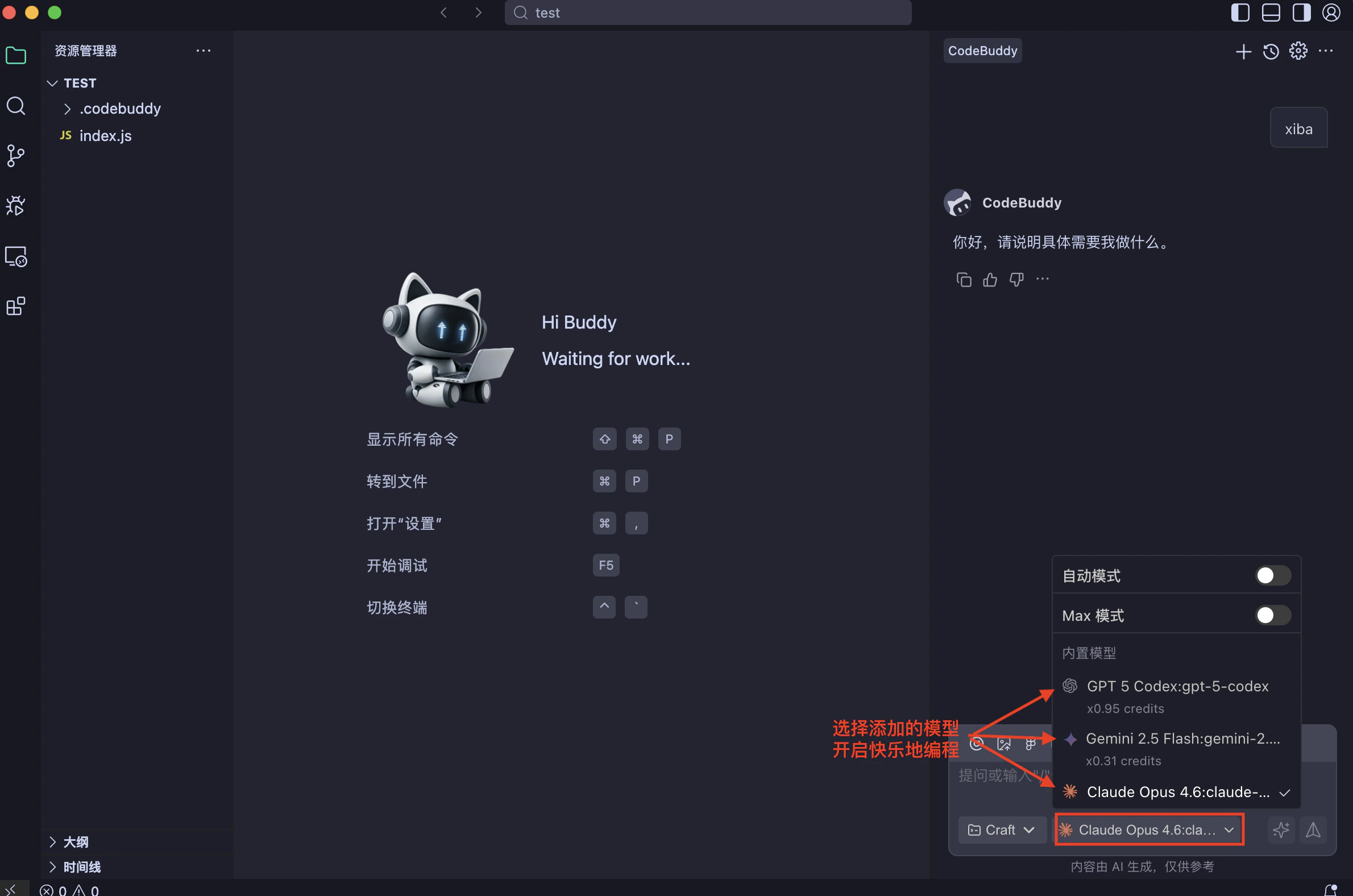
2.2 Add .codebuddy/models.json in your workspace

Workspace tree:
<your-workspace>
.codebuddy
models.json
Replace the apiKey environment variable to YOUR_API_KEY
{
    "models": [
        {
            "id": "gpt-5-codex",
            "name": "GPT 5 Codex",
            "vendor": "OpenAI",
            "url": "https://aiandgpu.com/v1/chat/completions",
            "apiKey": "sk-xxxx",
            "maxInputTokens": 128000,
            "maxOutputTokens": 4096,
            "supportsToolCall": true,
            "supportsImages": true,
            "supportsReasoning": true
        },
        {
            "id": "gemini-3.1-pro-preview",
            "name": "Gemini 3.1 Pro",
            "vendor": "Google",
            "url": "https://aiandgpu.com/v1/chat/completions",
            "apiKey": "sk-xxxx",
            "maxInputTokens": 128000,
            "maxOutputTokens": 4096,
            "supportsToolCall": true,
            "supportsImages": true,
            "supportsReasoning": true
        },
        {
            "id": "claude-opus-4-6",
            "name": "Claude Opus 4.6",
            "vendor": "Anthropic",
            "url": "https://aiandgpu.com/v1/chat/completions",
            "apiKey": "sk-xxxx",
            "maxInputTokens": 128000,
            "maxOutputTokens": 4096,
            "supportsToolCall": true,
            "supportsImages": true,
            "supportsReasoning": true
        },
        {
            "id": "claude-opus-4-6-thinking",
            "name": "Claude Opus 4.6 Thinking",
            "vendor": "Anthropic",
            "url": "https://aiandgpu.com/v1/chat/completions",
            "apiKey": "sk-xxxx",
            "maxInputTokens": 128000,
            "maxOutputTokens": 4096,
            "supportsToolCall": true,
            "supportsImages": true,
            "supportsReasoning": true
        },
        {
            "id": "claude-sonnet-4-6",
            "name": "Claude Sonnet 4.6",
            "vendor": "Anthropic",
            "url": "https://aiandgpu.com/v1/chat/completions",
            "apiKey": "sk-xxxx",
            "maxInputTokens": 128000,
            "maxOutputTokens": 4096,
            "supportsToolCall": true,
            "supportsImages": true,
            "supportsReasoning": true
        },
        {
            "id": "claude-sonnet-4-6-thinking",
            "name": "Claude Sonnet 4.6 Thinking",
            "vendor": "Anthropic",
            "url": "https://aiandgpu.com/v1/chat/completions",
            "apiKey": "sk-xxxx",
            "maxInputTokens": 128000,
            "maxOutputTokens": 4096,
            "supportsToolCall": true,
            "supportsImages": true,
            "supportsReasoning": true
        },
        {
            "id": "claude-haiku-4-5-20251001",
            "name": "Claude Haiku 4.5",
            "vendor": "Anthropic",
            "url": "https://aiandgpu.com/v1/chat/completions",
            "apiKey": "sk-xxxx",
            "maxInputTokens": 128000,
            "maxOutputTokens": 4096,
            "supportsToolCall": true,
            "supportsImages": true,
            "supportsReasoning": true
        },
        {
            "id": "claude-haiku-4-5-20251001-thinking",
            "name": "Claude Haiku 4.5 Thinking",
            "vendor": "Anthropic",
            "url": "https://aiandgpu.com/v1/chat/completions",
            "apiKey": "sk-xxxx",
            "maxInputTokens": 128000,
            "maxOutputTokens": 4096,
            "supportsToolCall": true,
            "supportsImages": true,
            "supportsReasoning": true
        }
    ],
    "availableModels": [
        "gpt-5-codex",
        "gemini-3.1-pro-preview",
        "claude-opus-4-6",
        "claude-opus-4-6-thinking",
        "claude-sonnet-4-6",
        "claude-sonnet-4-6-thinking",
        "claude-haiku-4-5",
        "claude-haiku-4-5-thinking"
    ]
}
Remember to add .codebuddy to your .gitignore file to protect your API key.

Why Replace Environment Variables:

Environment variable substitution is not a native JSON feature. It requires the application to actively implement parsing logic. CodeBuddy IDE does not implement this parsing when reading models.json, so it directly treats $ as your API Key and sends it out, resulting in authentication failure, which ultimately manifests as “session expired”. The IDE will keep prompting that the session has expired.
Configuration Priority: PROJECT_LEVEL > USER_LEVEL > BUILT_IN
models.json is a configuration file used to customize the model list and control the display of the model dropdown. This configuration supports two levels. Configuration merge priority from high to low:
  • Project-level: <your-workspace>/.codebuddy/models.json specific to the project, with the highest priority, overwriting user-level and built-in default configurations.
  • User-level: ~/.codebuddy/models.json global configuration for all projects, with secondary priority.
  • Built-in: default configuration with the lowest priority.
Explanation: Project-level configurations overwrite identical model definitions in user-level configurations (based on the id field). The availableModels field: Project-level completely overwrites user-level, without merging.

2.3 IDE Mode Comparision

ModePurposeExecute CodeUse Cases
CraftCoding✅ Yes, modifies filesGenerate code, modify files, implement features
AskQ&A❌ NoTechnical questions, suggestions, code explanation
PlanPlanning❌ NoStep-by-step planning, architecture design

3. Start Codebuddy

3.1 With CLI

cd <your-project-path>

codebuddy

3.2 With IDE

If you first time launch IDE, click log in button.