> ## Documentation Index
> Fetch the complete documentation index at: https://docs.aiandgpu.com/llms.txt
> Use this file to discover all available pages before exploring further.
# Codebuddy AI
## Tencent Cloud Codebuddy AI
[**Tencent Cloud Codebuddy AI**](https://www.codebuddy.ai/home) is an intelligent programming tool based on Tencent's Hunyuan Code Large Model, aiming to comprehensively improve developers' coding efficiency and code quality through advanced artificial intelligence technology. There are two ways to use:
* [**For CLI Installation**](#1-for-cli)
* [**For IDE Installation**](#2-for-ide)
## Key Features
Provides real-time code suggestions to accelerate the development process.
Automatically identifies and locates potential issues in the code, improving code robustness.
Offers instant technical support and answers to programming questions.
Analyzes code and provides suggestions for performance improvement.
Assists developers in generating standardized and efficient code.
Automatically identifies potential security vulnerabilities and suggests fixes in the code.
**Main uses:**
* Significantly improves development efficiency and reduces repetitive work.
* Enhances code quality and reduces error rates.
* Helps developers solve technical problems and learn new knowledge.
## 1. For CLI
### 1.1 Installation
**Option A: NPM**
Requires Node.js 18.0+
```shellscript theme={null}
npm install -g @tencent-ai/codebuddy-code
codebuddy --version // Verify installation
```
**Option B: Native Installer (Beta)**
The native installer provides a standalone **CodeBuddy** installation without the need for a Node.js environment.
**macOS/Linux:**
```shellscript theme={null}
curl -fsSL https://copilot.tencent.com/cli/install.sh | bash
```
**Windows:**
```shellscript theme={null}
irm https://copilot.tencent.com/cli/install.ps1 | iex
```
## 1.2 Add Permanent Shell Configuration
```bash theme={null}
# Check your Startup Script type. Print /bin/zsh or /bin/bash
echo $SHELL
```
* **For zsh users: `~/.zshrc`**
* **For bash users: `~/.bashrc`**
Replace your API Key [**AGCloud API key**](https://developer.aiandgpu.com/keys) configuration into ENV file.
```shellscript theme={null}
# If you want to use OpenAI models
export OPEN_API_KEY=sdk-xxx
# If you want to use Anthropic models
export ANTHROPIC_API_KEY=sdk-xxx
# If you want to use Google models
export GEMINI_API_KEY=sdk-xxx
```
**Make environment variables effective:**
```bash theme={null}
# for zsh
source ~/.zshrc
# for bash
source ~/.bashrc
```
**Verify environment variables were effected:**
```shellscript theme={null}
echo $OPEN_API_KEY
echo $ANTHROPIC_API_KEY
echo $GEMINI_API_KEY
```
## 1.3 Create `~/.codebuddy/models.json` if it doesn't exist.
For more configurations, please refer to [**CodeBuddy Document**](https://www.codebuddy.ai/docs/zh/cli/models)
```json theme={null}
{
"models": [
{
"id": "gpt-5-codex",
"name": "GPT 5 Codex",
"vendor": "OpenAI",
"url": "https://aiandgpu.com/v1/chat/completions",
"apiKey": "${OPEN_API_KEY}",
"maxInputTokens": 128000,
"maxOutputTokens": 4096,
"supportsToolCall": true,
"supportsImages": true,
"supportsReasoning": true
},
{
"id": "gemini-3.1-pro-preview",
"name": "Gemini 3.1 Pro",
"vendor": "Google",
"url": "https://aiandgpu.com/v1/chat/completions",
"apiKey": "${GEMINI_API_KEY}",
"maxInputTokens": 128000,
"maxOutputTokens": 4096,
"supportsToolCall": true,
"supportsImages": true,
"supportsReasoning": true
},
{
"id": "claude-opus-4-6",
"name": "Claude Opus 4.6",
"vendor": "Anthropic",
"url": "https://aiandgpu.com/v1/chat/completions",
"apiKey": "${ANTHROPIC_API_KEY}",
"maxInputTokens": 128000,
"maxOutputTokens": 4096,
"supportsToolCall": true,
"supportsImages": true,
"supportsReasoning": true
},
{
"id": "claude-opus-4-6-thinking",
"name": "Claude Opus 4.6 Thinking",
"vendor": "Anthropic",
"url": "https://aiandgpu.com/v1/chat/completions",
"apiKey": "${ANTHROPIC_API_KEY}",
"maxInputTokens": 128000,
"maxOutputTokens": 4096,
"supportsToolCall": true,
"supportsImages": true,
"supportsReasoning": true
},
{
"id": "claude-sonnet-4-6",
"name": "Claude Sonnet 4.6",
"vendor": "Anthropic",
"url": "https://aiandgpu.com/v1/chat/completions",
"apiKey": "${ANTHROPIC_API_KEY}",
"maxInputTokens": 128000,
"maxOutputTokens": 4096,
"supportsToolCall": true,
"supportsImages": true,
"supportsReasoning": true
},
{
"id": "claude-sonnet-4-6-thinking",
"name": "Claude Sonnet 4.6 Thinking",
"vendor": "Anthropic",
"url": "https://aiandgpu.com/v1/chat/completions",
"apiKey": "${ANTHROPIC_API_KEY}",
"maxInputTokens": 128000,
"maxOutputTokens": 4096,
"supportsToolCall": true,
"supportsImages": true,
"supportsReasoning": true
},
{
"id": "claude-haiku-4-5-20251001",
"name": "Claude Haiku 4.5",
"vendor": "Anthropic",
"url": "https://aiandgpu.com/v1/chat/completions",
"apiKey": "${ANTHROPIC_API_KEY}",
"maxInputTokens": 128000,
"maxOutputTokens": 4096,
"supportsToolCall": true,
"supportsImages": true,
"supportsReasoning": true
},
{
"id": "claude-haiku-4-5-20251001-thinking",
"name": "Claude Haiku 4.5 Thinking",
"vendor": "Anthropic",
"url": "https://aiandgpu.com/v1/chat/completions",
"apiKey": "${ANTHROPIC_API_KEY}",
"maxInputTokens": 128000,
"maxOutputTokens": 4096,
"supportsToolCall": true,
"supportsImages": true,
"supportsReasoning": true
}
],
"availableModels": [
"gpt-5-codex",
"gemini-3.1-pro-preview",
"claude-opus-4-6",
"claude-opus-4-6-thinking",
"claude-sonnet-4-6",
"claude-sonnet-4-6-thinking",
"claude-haiku-4-5",
"claude-haiku-4-5-thinking"
]
}
```
## 2. For IDE
### 2.1 Installation
Download Link: [https://www.codebuddy.ai/home](https://www.codebuddy.ai/home)
### 2.2 Add `.codebuddy/models.json` in your workspace
**Workspace tree:**
Replace the `apiKey` environment variable to **YOUR\_API\_KEY**
```json theme={null}
{
"models": [
{
"id": "gpt-5-codex",
"name": "GPT 5 Codex",
"vendor": "OpenAI",
"url": "https://aiandgpu.com/v1/chat/completions",
"apiKey": "sk-xxxx",
"maxInputTokens": 128000,
"maxOutputTokens": 4096,
"supportsToolCall": true,
"supportsImages": true,
"supportsReasoning": true
},
{
"id": "gemini-3.1-pro-preview",
"name": "Gemini 3.1 Pro",
"vendor": "Google",
"url": "https://aiandgpu.com/v1/chat/completions",
"apiKey": "sk-xxxx",
"maxInputTokens": 128000,
"maxOutputTokens": 4096,
"supportsToolCall": true,
"supportsImages": true,
"supportsReasoning": true
},
{
"id": "claude-opus-4-6",
"name": "Claude Opus 4.6",
"vendor": "Anthropic",
"url": "https://aiandgpu.com/v1/chat/completions",
"apiKey": "sk-xxxx",
"maxInputTokens": 128000,
"maxOutputTokens": 4096,
"supportsToolCall": true,
"supportsImages": true,
"supportsReasoning": true
},
{
"id": "claude-opus-4-6-thinking",
"name": "Claude Opus 4.6 Thinking",
"vendor": "Anthropic",
"url": "https://aiandgpu.com/v1/chat/completions",
"apiKey": "sk-xxxx",
"maxInputTokens": 128000,
"maxOutputTokens": 4096,
"supportsToolCall": true,
"supportsImages": true,
"supportsReasoning": true
},
{
"id": "claude-sonnet-4-6",
"name": "Claude Sonnet 4.6",
"vendor": "Anthropic",
"url": "https://aiandgpu.com/v1/chat/completions",
"apiKey": "sk-xxxx",
"maxInputTokens": 128000,
"maxOutputTokens": 4096,
"supportsToolCall": true,
"supportsImages": true,
"supportsReasoning": true
},
{
"id": "claude-sonnet-4-6-thinking",
"name": "Claude Sonnet 4.6 Thinking",
"vendor": "Anthropic",
"url": "https://aiandgpu.com/v1/chat/completions",
"apiKey": "sk-xxxx",
"maxInputTokens": 128000,
"maxOutputTokens": 4096,
"supportsToolCall": true,
"supportsImages": true,
"supportsReasoning": true
},
{
"id": "claude-haiku-4-5-20251001",
"name": "Claude Haiku 4.5",
"vendor": "Anthropic",
"url": "https://aiandgpu.com/v1/chat/completions",
"apiKey": "sk-xxxx",
"maxInputTokens": 128000,
"maxOutputTokens": 4096,
"supportsToolCall": true,
"supportsImages": true,
"supportsReasoning": true
},
{
"id": "claude-haiku-4-5-20251001-thinking",
"name": "Claude Haiku 4.5 Thinking",
"vendor": "Anthropic",
"url": "https://aiandgpu.com/v1/chat/completions",
"apiKey": "sk-xxxx",
"maxInputTokens": 128000,
"maxOutputTokens": 4096,
"supportsToolCall": true,
"supportsImages": true,
"supportsReasoning": true
}
],
"availableModels": [
"gpt-5-codex",
"gemini-3.1-pro-preview",
"claude-opus-4-6",
"claude-opus-4-6-thinking",
"claude-sonnet-4-6",
"claude-sonnet-4-6-thinking",
"claude-haiku-4-5",
"claude-haiku-4-5-thinking"
]
}
```
Remember to add `.codebuddy` to your `.gitignore` file to protect your API key.
## Why Replace Environment Variables:
> Environment variable substitution is not a native JSON feature. It requires the application to actively implement parsing logic. CodeBuddy IDE does not implement this parsing when reading models.json, so it directly treats \${OPEN_API_KEY} as your API Key and sends it out, resulting in authentication failure, which ultimately manifests as "session expired". The IDE will keep prompting that the session has expired.
**Configuration Priority:** `PROJECT_LEVEL` > `USER_LEVEL` > `BUILT_IN`
`models.json` is a configuration file used to customize the model list and control the display of the model dropdown. This configuration supports two levels.
**Configuration merge priority from high to low:**
* **Project-level:** `/.codebuddy/models.json` specific to the project, with the highest priority, overwriting user-level and built-in default configurations.
* **User-level:** `~/.codebuddy/models.json` global configuration for all projects, with secondary priority.
* **Built-in:** default configuration with the lowest priority.
Explanation: Project-level configurations overwrite identical model definitions in user-level configurations (based on the id field). The `availableModels` field: Project-level completely overwrites user-level, without merging.
## 2.3 IDE Mode Comparision
| Mode | Purpose | Execute Code | Use Cases |
| ----- | -------- | --------------------- | -------------------------------------------------- |
| Craft | Coding | ✅ Yes, modifies files | Generate code, modify files, implement features |
| Ask | Q\&A | ❌ No | Technical questions, suggestions, code explanation |
| Plan | Planning | ❌ No | Step-by-step planning, architecture design |
## 3. Start Codebuddy
### 3.1 With CLI
```shellscript theme={null}
cd
codebuddy
```
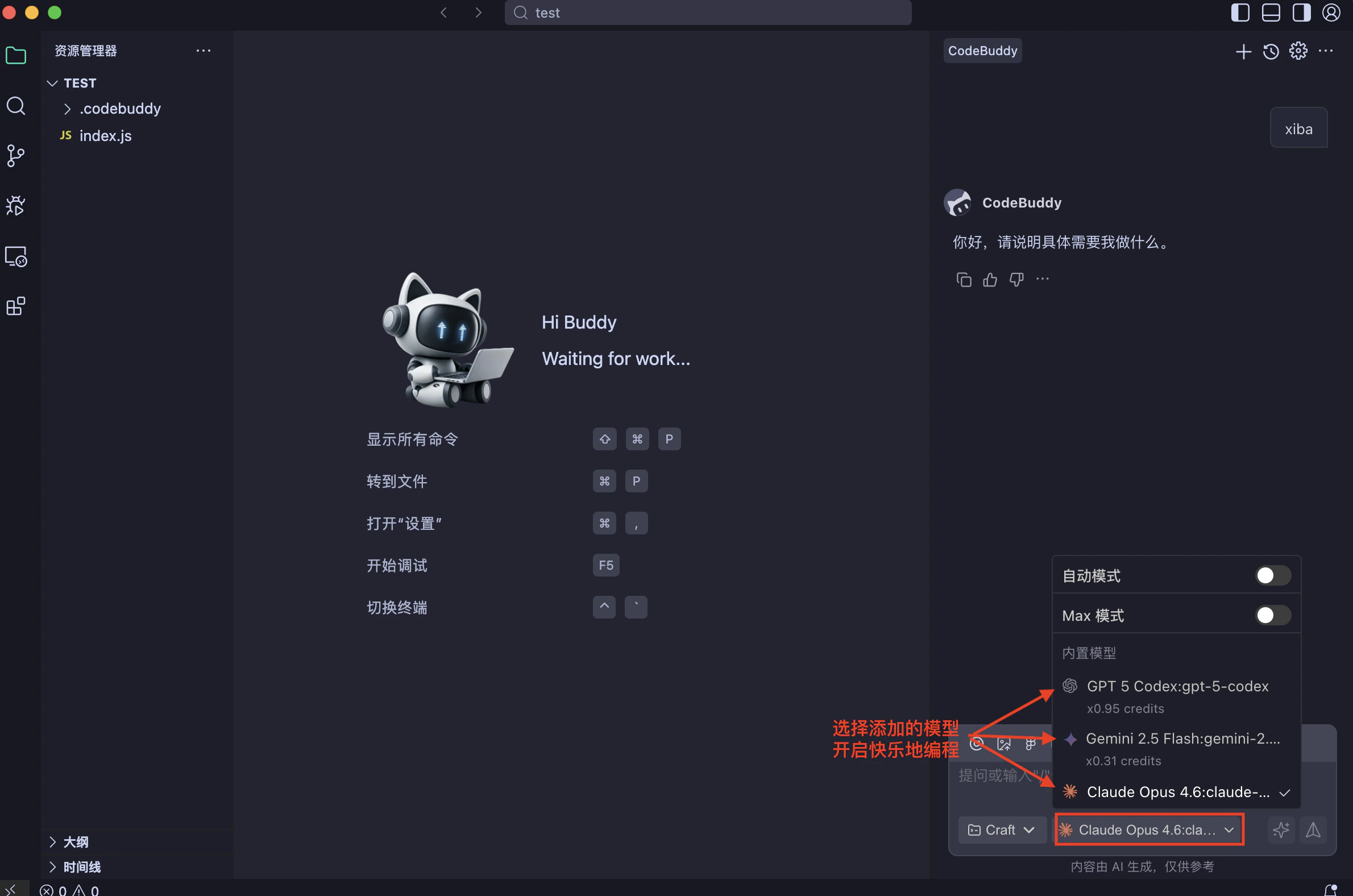
### 3.2 With IDE
If you first time launch IDE, click log in button.
 ## Resource Links:
* [**CodeBuddy AI CLI**](https://www.codebuddy.ai/docs/zh/cli/overview)
* [**CodeBuddy AI IDE**](https://www.codebuddy.ai/docs/zh/ide/Introduction)
* [**nodejs.org**](https://nodejs.org)
## Resource Links:
* [**CodeBuddy AI CLI**](https://www.codebuddy.ai/docs/zh/cli/overview)
* [**CodeBuddy AI IDE**](https://www.codebuddy.ai/docs/zh/ide/Introduction)
* [**nodejs.org**](https://nodejs.org)